
For UK Gas Safe registered engineers
CP12 app for gas engineers.
Create, sign and send digital Landlord Gas Safety Records from your phone or tablet. Keep the record, customer and property details together in Gas Certificate App.
No payment card required · iOS, Android and web

From the visit to the finished record
What is a CP12 app?
A CP12 app helps gas engineers create and manage digital Landlord Gas Safety Records, commonly called CP12s. Gas Certificate App brings the record together with saved customer and property details, signatures, PDF sharing and certificate history.
Choose the customer and property
Use saved details or add the landlord and inspection address for the current visit.
Record the current checks
Enter appliance, flue and inspection findings, including any defects and actions taken.
Review and add signatures
Check the completed information and add supported engineer and customer signatures.
Send and keep the PDF
Share the finished document and retain the synced record with the customer and property history.
Annual work, less repeat typing
Same property.
A fresh record.
Returning for another landlord visit? Use the details already in your account to reduce the repeat admin.
Duplicate a synced certificate
Start from a fully synced previous record, then review and update every copied field for the new visit.
Keep the property history together
Keep certificates and the related notes, photos and files with the customer and property they belong to.
Every visit needs its own findings. Complete the current gas safety check and review the new record before issuing it.

For jobs with poor signal
Prepare before
the signal drops.
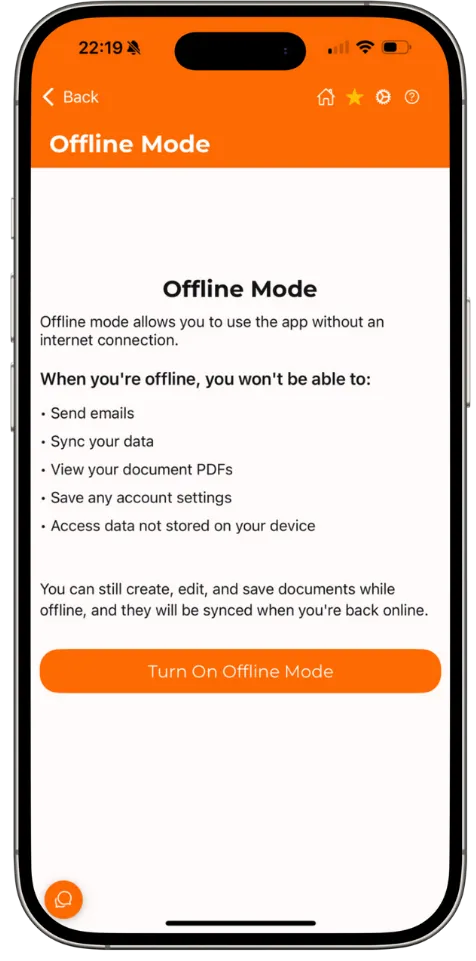
Mobile Offline Mode lets you create and save new supported certificate work locally on your device.
- While connected: switch Mobile Offline Mode on before you lose signal.
- On the job: create and save the new certificate work on your mobile.
- Back online: reconnect and sync the saved work to your account.
Sending records, opening previous certificates or PDFs, and desktop access need an internet connection.

The paperwork around the record
Your CP12.
The rest of the job.
Keep customer and property records alongside your diary, reminders, quotes and invoices. Use the online desktop platform when you want more room to review synced records and handle business admin.
Access depends on your user role. Engineer and office accounts have different certificate permissions.
Straight answers
CP12 app FAQs.
Digital records, repeat visits, devices and getting started.
For electronic record requirements in Great Britain, see the HSE gas safety record guidance .
Is a CP12 the same as a Landlord Gas Safety Record?
CP12 is a familiar name for a Landlord Gas Safety Record, also commonly called a landlord gas safety certificate. The record documents the results of the gas safety check.
Can I create, sign and send CP12 records in the app?
Yes. Gas Certificate App supports digital Landlord Gas Safety Records on compatible mobile phones and tablets, including record details, supported engineer and customer signatures, and sharing the finished PDF.
Can I duplicate a previous CP12?
Yes. Duplicate a fully synced previous certificate, then review and update every copied field for the current visit. The engineer must carry out the current check and record its findings before issuing the new document.
Does the CP12 app work without signal?
Mobile Offline Mode supports new certificate work when switched on while connected before you lose signal. Reconnect to sync. Sending records, opening previous certificates and PDFs, and desktop access require an internet connection.
Can I use the CP12 app on an iPhone, Android device or iPad?
Gas Certificate App supports compatible iOS and Android phones and tablets, including iPad. There is also an online desktop platform. Mobile and desktop tools differ, and access depends on your user role.
Are electronic gas safety records allowed?
HSE guidance for Great Britain allows electronic records if they can be reproduced on paper, are protected against loss and interference, and uniquely identify the engineer. Tenants must agree to electronic delivery and be able to access the record. A paper copy must be provided on request.
Can my office team access CP12 records?
The Gas Certificate App business account supports Main Engineer, Additional User and Admin User roles. Admin User certificate access is assign-only, while engineer roles have different certificate permissions. Each person needs their own login and subscription. Check the current feature comparison for role access.
How much does the CP12 app cost?
CP12 tools are part of Gas Certificate App. A subscription costs £20 + VAT per active user per month, or £216 + VAT per active user per year. Annual billing saves 10%. A free 14-day trial is available without a payment card.
Put it to work on your next visit
Your next CP12.
Less repeat admin.
Explore digital records, customer history and the tools around the job in Gas Certificate App.