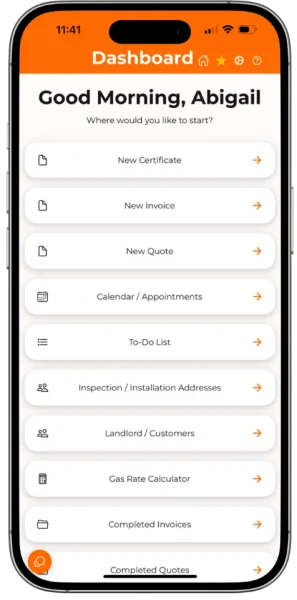
Built for gas engineers

Gas engineer software that keeps the whole job together

Create digital certificates with built-in tools, manage jobs and customers, send appointment reminders, reuse previous work and handle quotes and invoices across mobile and desktop.

  • Built-in gas rate calculator
  • Boiler manuals in certificates
  • Mobile Offline Mode

No payment card required.

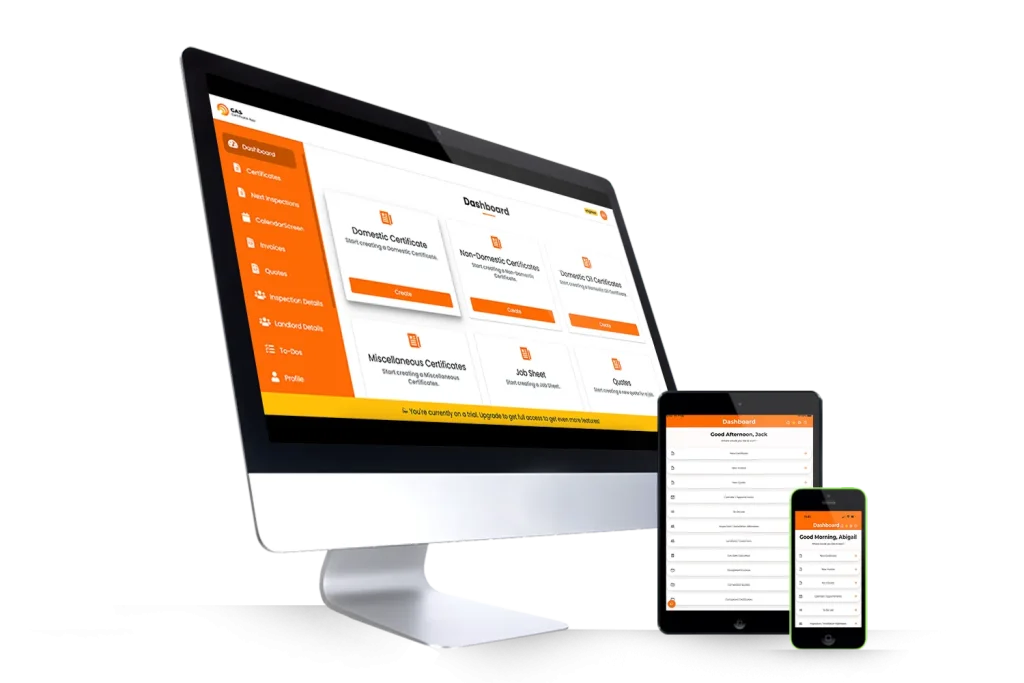
Gas Certificate App shown across desktop, tablet and mobile devices One connected workflow across mobile and desktop

Everything from day one

The tools you need without a complicated plan

Get the complete Gas Certificate App toolkit from the start, whether you work alone or manage a growing team.

Try it free for 14 days

Create certificates and explore jobs, quotes and invoices before you decide whether to subscribe. No payment card is required.

All the tools in one plan

No basic, pro or premium packages to pick through. Each user is £20 + VAT per month or £216 + VAT per year.

Set up your team your way

Give Additional Users access to the tools they need while the Main Engineer stays in control of their permissions.

Made for the working day

Six tools that make life easier for gas engineers

Complete certificates, check calculations, find boiler information and keep customers updated without jumping between different apps.

Faster repeat jobs

Duplicate a certificate instead of starting again

Returning to the same property or completing similar work? Duplicate an existing certificate, then update the details that have changed.

Less repetitive typing when the job details are similar.
Gas Certificate App duplicate certificate confirmation shown on a mobile phone

Digital certificates

Create and manage domestic, non-domestic, oil and other job records from the same app, then send the completed paperwork to your customer.

Built-in Gas Rate Calculator

Work out the gas rate while completing the job, without leaving the certificate to find a separate calculator.

Boiler manuals inside certificates

Open the relevant boiler manual while working on a certificate, so the information you need stays close to the job.

Appointment reminders customers can answer

Send reminders by email and let customers accept or decline, helping you confirm visits before setting off.

Mobile Offline Mode

Prepare Offline Mode before losing signal, create new certificate work on your mobile, then sync it after reconnecting.

How Offline Mode works
Gas Certificate App Offline Mode displayed on a mobile phone

Mobile Offline Mode

No signal? You can still get the certificate done

Basements, plant rooms and rural jobs are not always kind to phone signal. Switch Offline Mode on before you lose connection, then create and save new certificate work on your mobile.

  1. Before you lose signal

    Open the mobile app while connected and switch Offline Mode on.

  2. While you are on the job

    Create and save new certificate work on your mobile without an internet connection.

  3. When you are connected again

    Reconnect and sync the saved work back to your Gas Certificate App account.

Good to know: previous certificates and PDFs need an internet connection, and the desktop platform is online only.
See how Offline Mode works

One plan, flexible user access

Choose how you pay and set up your team

Gas Certificate App does not hide features behind pricing tiers. Choose monthly or yearly billing, add the users you need and set their access to suit the way your business works.

Monthly prices selected.

Additional User

For another engineer or team member. The Main Engineer can control their permissions.

£20/month+ VAT

£20 + VAT per month, billed monthly.

Compare role access

Admin User

For office staff managing customers, jobs and business admin without completing engineer-only work.

£20/month+ VAT

£20 + VAT per month, billed monthly.

Compare role access

Every user role is £20 + VAT per month or £216 + VAT per year. Yearly billing works out at £18 + VAT per month and saves 10%.

Full feature comparison

Open or close each category, or use the filters to focus on one part of the workflow. All three roles remain visible on mobile.

Certificates6 features
Certificate access by Gas Certificate App user role
FeatureMain EngineerAdditional UserAdmin User
Domestic Gas CertificatesIncludedIncludedAssign only
Commercial Gas CertificatesIncludedIncludedAssign only
LPG CertificatesIncludedIncludedAssign only
Oil CertificatesIncludedIncludedAssign only
Renewable CertificatesIncludedIncludedAssign only
Miscellaneous CertificatesIncludedIncludedAssign only
Certificate Tools9 features
Certificate tool access by Gas Certificate App user role
FeatureMain EngineerAdditional UserAdmin User
Upcoming Certificate Reminders DashboardIncludedIncludedIncluded
Customer acceptance or decline of upcoming certificate remindersIncludedIncludedIncluded
Import readings from supported Testo, TPI and Sauermann analysersIncludedIncludedNot included
View a boiler manual while completing a certificateIncludedIncludedNot included
Create an invoice from a certificateIncludedIncludedIncluded
Digital signaturesIncludedIncludedIncluded
Share by WhatsApp, SMS and emailIncludedIncludedIncluded
Upload a company, Gas Safe or OFTEC logoIncludedIncludedIncluded
Upload photos and filesIncludedIncludedIncluded
Gas Engineer Tools3 features
Gas engineer tool access by Gas Certificate App user role
FeatureMain EngineerAdditional UserAdmin User
Gas Rate CalculatorIncludedIncludedNot included
Boiler ManualsIncludedIncludedIncluded
Import readings from supported Testo, TPI and Sauermann analysersIncludedIncludedNot included
Additional Features11 features
Additional feature access by Gas Certificate App user role
FeatureMain EngineerAdditional UserAdmin User
Offline ModeIncludedIncludedIncluded
Email status trackingIncludedIncludedIncluded
Import a customer databaseIncludedIncludedIncluded
In-app notificationsIncludedIncludedIncluded
Automated SMS reminders (add-on)IncludedIncludedIncluded
Postcode lookupIncludedIncludedIncluded
Unlimited storageIncludedIncludedIncluded
To-do listIncludedIncludedIncluded
Access on Apple, Android and desktopIncludedIncludedIncluded
Live chat and telephone customer supportIncludedIncludedIncluded
Manage user permissionsIncludedAvailable with permissionIncluded
Invoices7 features
Invoice feature access by Gas Certificate App user role
FeatureMain EngineerAdditional UserAdmin User
Invoice payment remindersIncludedIncludedIncluded
Opened and unopened status trackingIncludedIncludedIncluded
Advanced reportingIncludedIncludedIncluded
VAT calculationsIncludedIncludedIncluded
Mark invoices as paid or unpaidIncludedIncludedIncluded
Share by WhatsApp, SMS and emailIncludedIncludedIncluded
Upload photos and filesIncludedIncludedIncluded
Quotes6 features
Quote feature access by Gas Certificate App user role
FeatureMain EngineerAdditional UserAdmin User
Accept or decline notificationsIncludedIncludedIncluded
Convert a quote to an invoiceIncludedIncludedIncluded
Share by WhatsApp, SMS and emailIncludedIncludedIncluded
Opened and unopened status trackingIncludedIncludedIncluded
Upload photos and filesIncludedIncludedIncluded
Advanced dashboardIncludedIncludedIncluded
Job and Diary Management6 features
Job and diary feature access by Gas Certificate App user role
FeatureMain EngineerAdditional UserAdmin User
Job sheetsIncludedIncludedIncluded
Job scheduling calendarIncludedIncludedIncluded
Link jobs to customersIncludedIncludedIncluded
Job notes and detailsIncludedIncludedIncluded
Engineer notifications and alertsIncludedIncludedIncluded
Multi-engineer schedulingIncludedAvailable with permissionIncluded
Integrations5 features
Integration access by Gas Certificate App user role
FeatureMain EngineerAdditional UserAdmin User
QuickBooks integrationIncludedIncludedIncluded
Xero data exportIncludedIncludedIncluded
SMS reminder systemIncludedIncludedIncluded
Email and in-app notificationsIncludedIncludedIncluded
Import customer data by CSV or reportsIncludedIncludedIncluded

Available with permission means the Main Engineer can enable access for that Additional User. Optional SMS reminders require paid credits. Offline Mode is for supported mobile certificate work and must be switched on before losing connection.

Connected workflows

Accounting and gas analyser integrations

Gas Certificate App supports accounting workflows with QuickBooks and Xero, and can import readings from compatible Testo, TPI and Sauermann gas analysers.

QuickBooks uses an integration, Xero uses a supported data export, and analyser compatibility depends on the device and model.

Ask about compatibility
Integration

QuickBooks integration

Connect your billing workflow with the Gas Certificate App QuickBooks integration.

Data export

Xero data export

Export supported data from Gas Certificate App for use in your Xero accounting workflow.

Device connection

Gas analyser connections

Clear answers

Gas Certificate App feature FAQs

Straightforward answers about certificates, pricing, devices, offline work, accounting connections and team access.

10 common questions answered


Ask another question
01 What can I do with Gas Certificate App?
Gas Certificate App brings certificates, customers, properties, jobs, quotes, invoices and reminders into one system. You can also store job files and photos, track communications and access business reporting tools.
02 Which certificates and records can I create?
You can create a range of domestic, non-domestic, oil and renewable certificates and records, including Gas Safety Records, CP12s, LGSRs, Powerflush certificates and job sheets. Availability depends on the record type supported in the app.
03 How much does Gas Certificate App cost?
Gas Certificate App costs £20 plus VAT per user each month, or £216 plus VAT per user when paid yearly. The yearly option saves 10%. Main Engineer, Additional Engineer and Admin User subscriptions use the same per-user price.
04 Can I try Gas Certificate App before subscribing?
Yes. You can start a 14-day free trial without entering payment-card details. Use the trial to test the certificate, job and customer workflows before choosing monthly or yearly billing.
05 Does Gas Certificate App work offline?
Yes, for new certificate work in the mobile app. Turn Offline Mode on before you lose signal, then create, edit and save new certificates locally. Your work syncs when you reconnect. Previous certificates and PDFs require an internet connection, and desktop use is online only.
06 Can I use Gas Certificate App on mobile and desktop?
Yes. Gas Certificate App is available on iOS and Android mobile devices and through the desktop web platform. An internet connection is required for desktop use.
07 Does Gas Certificate App connect with QuickBooks or Xero?
Yes. Gas Certificate App supports a QuickBooks integration and a Xero data export, helping you move supported billing information into your accounting workflow. The connection method differs between the two services.
08 Which gas analysers can connect with the app?
Gas Certificate App can import readings from supported Testo, TPI and Sauermann devices. Compatibility varies by analyser brand, model and connection method, so check your specific device with the GCA team before relying on the connection.
09 Can a business add engineers and admin users?
Yes. Businesses can use Main Engineer, Additional Engineer and Admin User roles. Access differs by role, so use the comparison table above to check which tools each user needs before adding subscriptions.
10 Is customer support included?
Yes. Live chat and customer support are included with Gas Certificate App subscriptions. If you need help with setup, compatibility or using a feature, contact the team through the Customer Support Chat.

Ready when you are

Try Gas Certificate App free for 14 days

Explore certificates, job management and customer records across mobile and desktop. No payment card is required to begin your trial.

Before You Go!

Start a 14 Day Free Trial. No Card Details Needed!